Before contacting support!

Before reporting an issue, be sure to read the information contained in this topic! Failure to familiarize yourself with it may result in a warning or ban!


First of all, remember - do not expect an immediate response - we usually try to respond as quickly as possible, but each of us has a private life.

If Crystal Launcher has problems connecting to the server/changing skin/downloading packages, check if the servers are working properly on this page: https://status.crystal-launcher.net/

:small_blue_diamond: :small_blue_diamond: :small_blue_diamond: Index :small_blue_diamond: :small_blue_diamond: :small_blue_diamond:

:right_arrow: Section 1: Introduction READ MANDATORY
:right_arrow: Section 2: Most common errors
:right_arrow: Section 3: For people with older hardware/integrated graphics/system requirements
:right_arrow: Section 4: How to report a bug on forum
:right_arrow: Section 5: What to do if the skin/cape doesn’t show up
:right_arrow: Section 6: Cape template

:small_blue_diamond: :small_blue_diamond: :small_blue_diamond: Section 1: Introduction :small_blue_diamond: :small_blue_diamond: :small_blue_diamond:

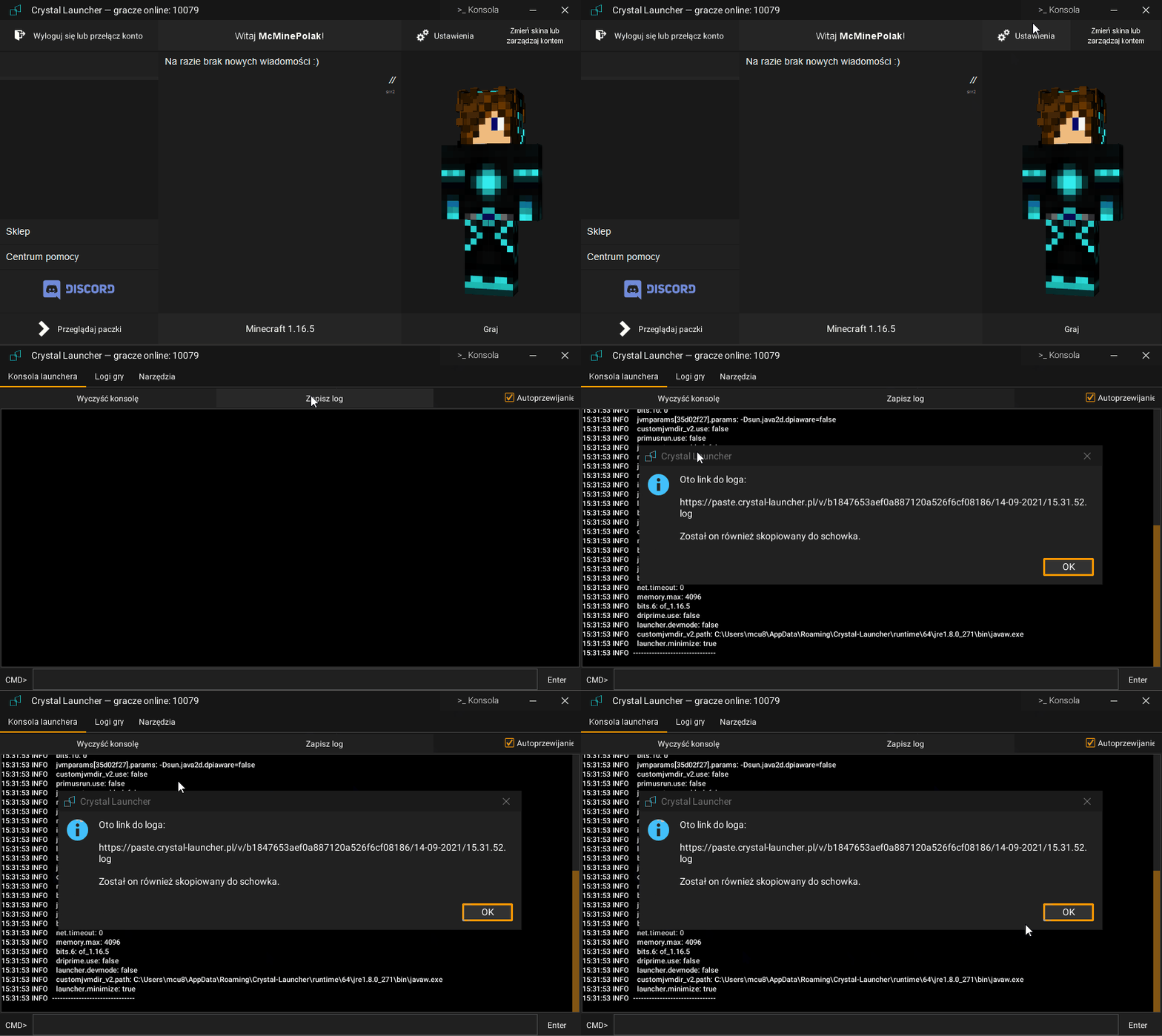
1.1. If you are reporting a bug - always include (if possible) console logs from the launcher after the error occurs (not after restarting the launcher), as they contain useful information that will help resolve the issue faster
log

1.2. --------------------------------------------------
** IF YOU CANNOT SEND LOGS USING THE "SAVE LOG" BUTTON FOR ANY REASON:**

In the launcher installation folder (by default %AppData%) there is a log folder, from where you can send the latest.log file

:small_blue_diamond: :small_blue_diamond: :small_blue_diamond: Section 2 :small_blue_diamond: :small_blue_diamond: :small_blue_diamond:

Due to the recurring nature of the same problems, here is a brief description of what you need to do to properly report a bug

2.1. --------------------------------------------------
LAUNCHER DOESN’T WORK PROPERLY / DOESN’T INSTALL AND I HAVE AVAST/AVG

(if you really must use these wonderful creatures): it is recommended to disable protection during launcher installation - for some reason it sometimes blocks copying the installer file to the installation directory and causes incomplete package downloads / prevents them from running with a “ClassNotFoundException” error
(btw if you’re using Windows 10, it’s better to stick with Windows Defender, it’s better and free)

2.2. --------------------------------------------------
If the launcher starts in offline mode:

:right_arrow: Add launcher to firewall exceptions
Go to launcher settings, then in the “Network” tab click the “Add Windows Firewall exception” button
:right_arrow: Check if you have access to https://crystal-launcher.pl
If you don’t have access to this site, it may mean there are problems with Crystal Launcher’s infrastructure and you just need to wait
:right_arrow: Check if you have an up-to-date and supported operating system
If you don’t have an updated system, there may be problems with SSL encryption support which can cause the launcher to start in Offline mode
:right_arrow: Try (if possible) to run the launcher on a hotspot from your phone
This will eliminate the factor that may be your internet provider.

2.3. --------------------------------------------------
If you have problems with the launcher, first perform the following steps:

1) Restart your computer (really, a simple thing that can sometimes save a lot of time)
2) Download the current version from the website (sometimes the launcher program is damaged and needs to be downloaded again because it can’t update itself)
3) If that doesn’t help - try using the “test release”
4) Delete all content from the Crystal Launcher installation folder (default %AppData%\\Crystal-Launcher or ~/.Crystal-Launcher on Linux) and reinstall the launcher
REMEMBER TO BACK UP THE “Instances” FOLDER AS IT CONTAINS PACK FILES AND SAVES
5) Check if your antivirus program is blocking Crystal Launcher’s access to the internet/files
6) Check if you have at least 2 GB of free disk space

2.4. --------------------------------------------------
If the pack doesn’t start:

:right_arrow: Try reinstalling the pack
:right_arrow: Try setting RAM settings automatically (Launcher settings, Set Automatically button)
:right_arrow: Update your graphics card drivers
:right_arrow: Check if you have enough RAM and hard drive space (you can easily check this in Task Manager)

:small_blue_diamond: :small_blue_diamond: :small_blue_diamond: Section 3 :small_blue_diamond: :small_blue_diamond: :small_blue_diamond:

3.1. If Minecraft crashes and you have Intel integrated graphics (1st-4th generation i3-i7 and Core2 series/some Celerons/Pentiums) and Windows 10:

Download the installer from the website, during installation click “Advanced Options” and change “Java Instance Branch” to “patched_intel”~~\nPobierz aktualną wersję - Crystal Launcher

*You can check your CPU generation by the processor symbol, e.g.\n - i5-4700 is 4th generation\n - i7-2600 is 2nd generation\n - i5-750 is 1st generation (3-digit symbol)

Error in launcher console generated by this problem:\njava.lang.IllegalStateException: GLFW error 65542: WGL: The driver does not appear to support OpenGL\n\n3.2. --------------------------------------------------\nAlso remember about minimum requirements, not every configuration can run the latest game version!!!:\n------------------------------------------------------\n​:right_arrow: CPU: Intel Core i3-3210 3.2 GHz / AMD A8-7600 APU 3.1 GHz or similar\n​:right_arrow: RAM: 4GB\n​:right_arrow: Graphics (integrated): Intel HD Graphics 4000 (Ivy Bridge) or AMD Radeon R5 series (Kaveri line) with OpenGL 4.4 support\n​:right_arrow: Graphics (dedicated): Nvidia GeForce 400 Series or AMD Radeon HD 7000 series with OpenGL 4.4 support\n​:right_arrow: Disk space: At least 1 GB (though I recommend 2-3GB)\n​:right_arrow: Operating system:\n- Windows: Windows 7 or newer\n- macOS: Any 64-bit system version 10.9 Maverick or newer\n- Linux: Any modern 64-bit distribution from 2014 onwards

:small_blue_diamond: :small_blue_diamond: :small_blue_diamond: Section 4 :small_blue_diamond: :small_blue_diamond: :small_blue_diamond:

After performing the above steps, only then report the issue on the technical support forum:
The forum has subcategories, try to report problems in the appropriate category.

4.1. --------------------------------------------------
If it concerns a problem with launching the game:

:right_arrow: Console log from the launcher after attempting to launch the game (Console button and Save log, Send to server (it will then copy the link to clipboard - paste the link from clipboard into the message) DO NOT TAKE A PHOTO/SCREENSHOT OF THE LOG
:right_arrow: If an error is displayed, send a screenshot of it NOT A PHOTO

4.2.--------------------------------------------------
If it concerns a problem with launching the launcher (NOT PACKS):

:right_arrow: Specify your operating system, amount of RAM, whether you have a 32-bit or 64-bit operating system (if you don’t know where to find this - search on Google e.g. “how to check how much RAM I have” - searching doesn’t hurt)
:right_arrow: Provide a LEGIBLE screenshot of the error
:right_arrow: Content of the file located in %LocalAppData%\CrystalLauncherInstaller\launchlog.txt
:right_arrow: (if it exists) latest.log file from \u003cfolder where Crystal is installed\u003e\logs

:small_blue_diamond: :small_blue_diamond: :small_blue_diamond: Section 5 :small_blue_diamond: :small_blue_diamond: :small_blue_diamond:

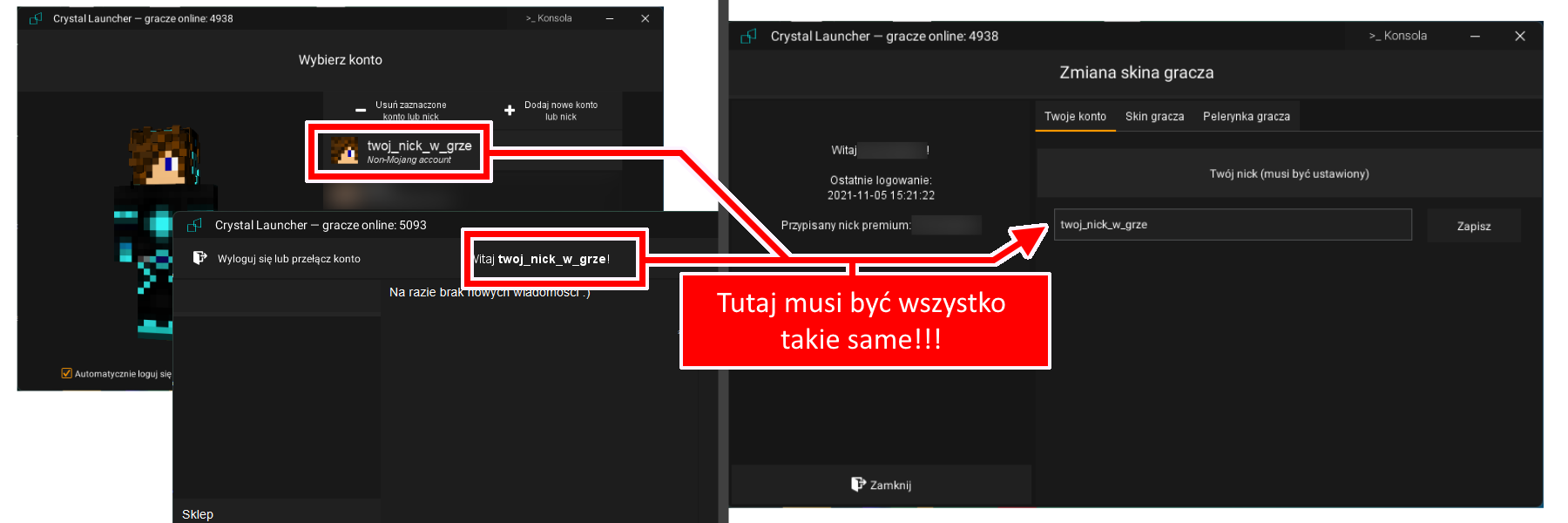
Before reporting an issue with the skin system, please carefully review this image. I also note that in the 3D view in the launcher, the capes are not visible - they are only visible in the game!

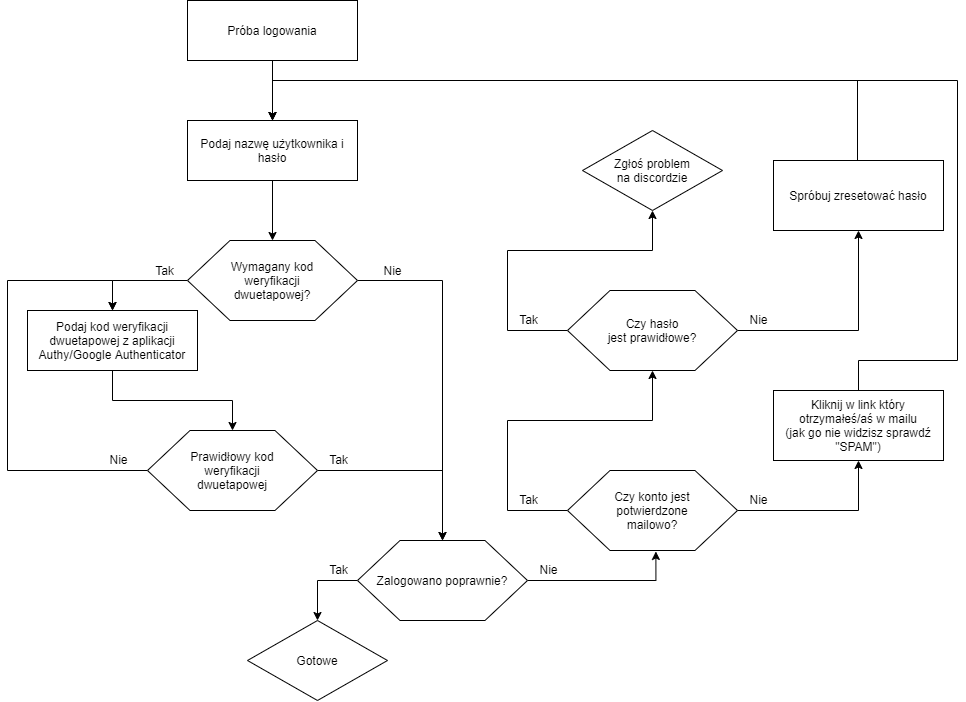
Here, on the other hand, are the steps that should be taken to resolve the issue with logging into the Crystal Launcher account

:small_blue_diamond: :small_blue_diamond: :small_blue_diamond: Section 6 :small_blue_diamond: :small_blue_diamond: :small_blue_diamond:

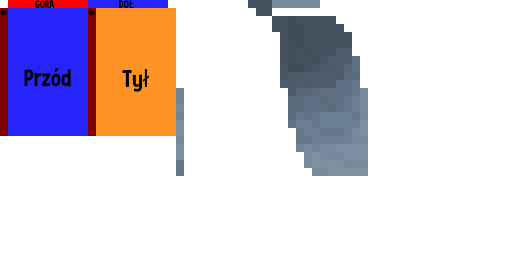
Template for the cloak, I recommend using Paint[.]NET (Download) (or any other program that supports transparency) for editing

If you have a problem installing Crystal Launcher and installed Avasta/AVG, try turning it off during installation.

Recently, many people have reported problems downloading files, for them I recommend changing the DNS server to the one from Google, here is a guide: